
Volkswagen EOS (RNS 510)
In order to update your GPS device: Volkswagen EOS (RNS 510) with the latest update, follow next instructions.
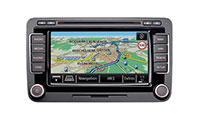
First of all, be sure you got the update file for your Volkswagen EOS (RNS 510) device, downloaded from SpeedcamUpdates.com.
If still haven't got it, you can get it now filling the form you see on this page.
- Extract files from the SpeedcamUpdates zip package. If the file you have downloaded is not a ZIP file means the file is already decompressed, and you can continue with the next step of this installation instructions.
- Insert an SD card into your PC and extract the contents of the zip file downloaded from SpeedcamUpdates.com into the SD card.
- Press button SETUP on the right side of your Volkswagen EOS (RNS 510) GPS device.
- Touch the Navigation button on the screen.
- Touch Personal POI button on the screen.
- Touch import button on the screen.
- Press the button to import data.
- Finally press OK button to finish import process.
- Now you can setup the speed cameras categories to set the distance alert.
Remember you can customize freely your download. Get access to the customer control panel and using the customization tool in order to get a customized speedcam database according to your needs. You will need this tool if your device doesn't accept the size of the new update. You can add and remove countries speedcam data to your current setup.
Volkswagen EOS (RNS 510) Speed Camera Update Information
The Volkswagen EOS (RNS 510) GPS navigation system comes pre-installed with maps that cover North America, including the USA, Canada, and Mexico. To ensure you have the most accurate and up-to-date navigation experience, it is essential to regularly update your map database. The latest map updates can be downloaded from Volkswagen's official website. These updates enhance route accuracy, provide new points of interest, and improve overall navigation performance, ensuring that you can navigate efficiently and effectively.
To update the RNS 510 maps, begin by downloading the latest map update from the Volkswagen website onto an SD card. Ensure that the SD card is formatted correctly and has sufficient storage space. Once the download is complete, insert the SD card into the RNS 510 unit. Access the navigation menu and follow the on-screen prompts to initiate the update process. This typically involves selecting the update option and confirming the installation. Allow the system to complete the update, which may take several minutes, before removing the SD card.
The RNS 510 provides comprehensive route guidance, featuring both 2D and 3D map views, along with a split-screen display that shows essential navigation information. Users can easily input their destination by pressing the navigation hard key and selecting the address soft key on the screen. Additionally, the system can alert drivers to speed camera locations, enhancing safety and compliance with traffic regulations. By utilizing these features, drivers can navigate with confidence and stay informed about their surroundings while on the road.
Looking for additional GPS update information and compatible navigation systems?
GPS Update & Installation Guide