
Skoda Columbus Firmware 3XXX
In order to update your GPS device: Skoda Columbus Firmware 3XXX with the latest update, follow next instructions.
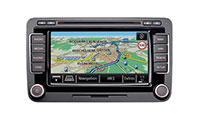
First of all, be sure you got the update file for your Skoda Columbus Firmware 3XXX device, downloaded from SpeedcamUpdates.com.
If still haven't got it, you can get it now filling the form you see on this page.
- Extract files from the SpeedcamUpdates zip package. If the file you have downloaded is not a ZIP file means the file is already decompressed, and you can continue with the next step of this installation instructions.
- Insert an SD card into your PC and extract the contents of the zip file downloaded from SpeedcamUpdates.com into the SD card.
- Press button SETUP on the right side of your Skoda Columbus Firmware 3XXX GPS device.
- Touch the Navigation button on the screen.
- Touch Personal POI button on the screen.
- Touch import button on the screen.
- Press the button to import data.
- Finally press OK button to finish import process.
- Now you can setup the speed cameras categories to set the distance alert.
Remember you can customize freely your download. Get access to the customer control panel and using the customization tool in order to get a customized speedcam database according to your needs. You will need this tool if your device doesn't accept the size of the new update. You can add and remove countries speedcam data to your current setup.
Skoda Columbus Firmware 3XXX Speed Camera Update Information
The Skoda Columbus Firmware 3XXX provides comprehensive map coverage for various regions, including Europe, Japan, and Taiwan. The latest updates include the 2026/2027 Europe maps, which offer full coverage at 15.85 GB, and the 2026 RoW maps at 17.23 GB. For users in Japan, the 2024 maps are available at 12.63 GB. Regular map updates are essential for ensuring accurate navigation, as GPS data undergo constant changes. Keeping your map database current enhances route accuracy and overall navigation experience, allowing for efficient travel across different regions.
To update your Skoda Columbus GPS navigation system, you will need a USB drive or SD card. Begin by downloading the latest map updates from the Škoda Auto update portal. Once downloaded, extract the files and transfer them to your USB or SD card. Insert the card into the Columbus unit and follow the on-screen instructions to initiate the update process. Ensure that your vehicle is in a safe location during the update, as it may take some time to complete. Regular updates are crucial for maintaining optimal navigation performance.
The Skoda Columbus navigation system offers precise route guidance, ensuring you reach your destination efficiently. With the latest map updates, users can benefit from real-time traffic information and optimized routing. Additionally, the system includes speed camera alerts, enhancing driver awareness and safety. By keeping your maps updated, you can avoid outdated routes and potential delays, making your driving experience smoother. Utilizing these features effectively can significantly improve your navigation experience, allowing for informed decision-making while on the road.
Looking for additional GPS update information and compatible navigation systems?
GPS Update & Installation Guide