
Seat Ibiza ( Navi System ) ( 6P0 )
In order to update your GPS device: Seat Ibiza ( Navi System ) ( 6P0 ) with the latest update, follow next instructions.
First of all, be sure you got the update file for your Seat Ibiza ( Navi System ) ( 6P0 ) device, downloaded from SpeedcamUpdates.com.
If still haven't got it, you can get it now filling the form you see on this page.
- Extract files from the SpeedcamUpdates zip package. If the file you have downloaded is not a ZIP file means the file is already decompressed, and you can continue with the next step of this installation instructions.
- Select the "NAV" tab
- Insert the SD card containing the downloaded and unzipped data in slot 2 of the GPS Device
- Select Memory administration.
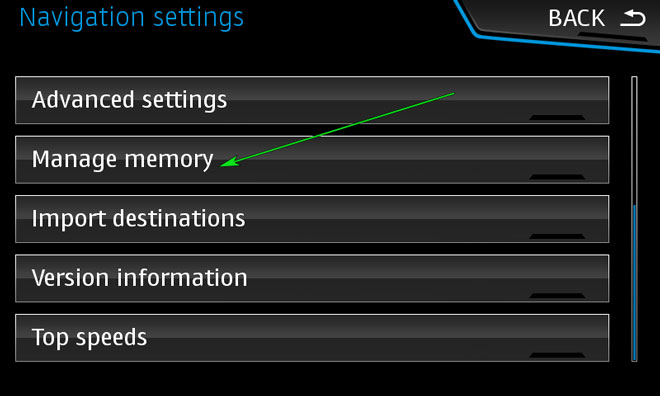
- Update my special destinations (POI)
- Select "Update my POI"
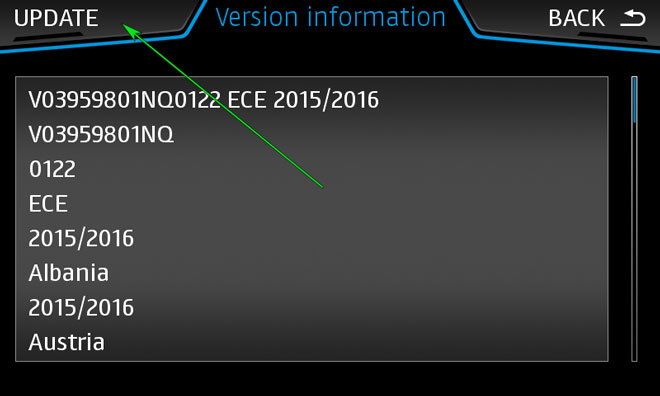
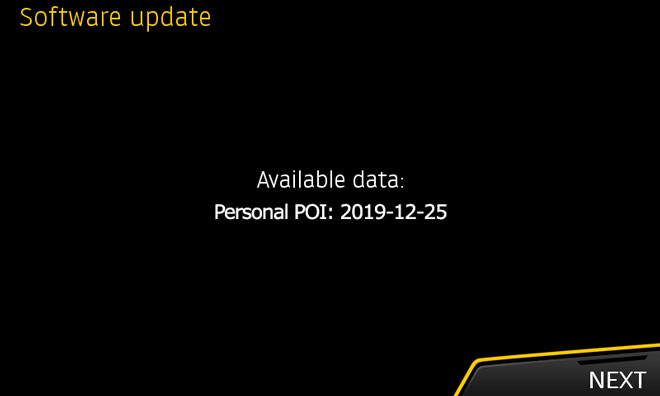
- When "Software Update Available" is shown on the screen, you have to select Update and Next
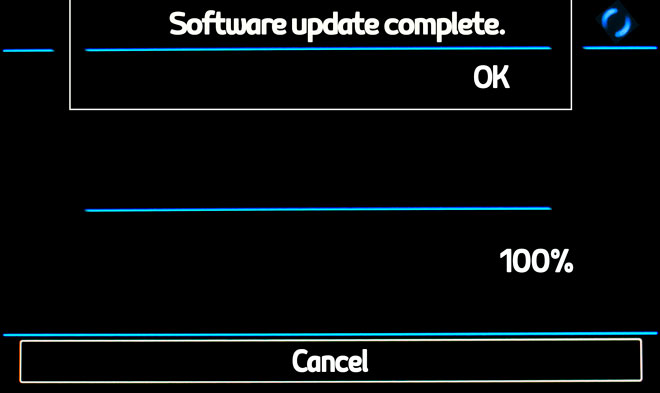
- When import procedure has finished then return to NAV
- Select "Map"
- Select "Show POI"
- Select "Show Categories"
- Scroll down till I see Speedcameras and tick them (mark with ?V?-sign).
- The cameras will be shown on the map. When you approach to the camera a weak warning sound is played. This could happen or not depending on the models.
If you get an error message when you're updating your device, follow next steps. Insert the SD card into your computer again. Copy the file named 'metainfo2.txt" contained in PersonalPOI/MIB2HIGH folder into the root of SD card replacing the meta2info.txt file that should be already there. Also copy completely the folder PersonalPOI into the root folder replacing the PersonalPOI folder already there. Extract the SD card from your computer and insert it into your GPS device again. Repeat the installation procedure.
Remember you can customize freely your download. Get access to the customer control panel and using the customization tool in order to get a customized speedcam database according to your needs. You will need this tool if your device doesn't accept the size of the new update. You can add and remove countries speedcam data to your current setup.
Seat Ibiza ( Navi System ) ( 6P0 ) Speed Camera Update Information
The SEAT Ibiza's Navi System (6P0) provides extensive map coverage across Europe, ensuring you have access to millions of square kilometers of navigable terrain. To keep your navigation experience optimal, it's essential to regularly update the map database. The latest update, SEAT V12 Navigation AS SD Card, includes the most current road information and points of interest. You can check the current version of your map data by pressing the "MENU" button on your infotainment system. This allows you to confirm if an update is necessary for your navigation system.
To update your SEAT Ibiza's Navi System maps, you will need the SD card that contains the previous map data, which is located in SD card slot 2. Begin by removing the SD card from the slot and inserting it into your computer. Download the latest map package specific to your SEAT model from the official SEAT website. Once downloaded, transfer the updated map files back onto the SD card. Finally, reinsert the SD card into the Navi System and follow the on-screen instructions to complete the update process.
The SEAT Ibiza's Navi System offers reliable route guidance, helping you navigate efficiently to your destination. It provides real-time directions and can adjust routes based on traffic conditions. Additionally, the system includes speed camera alerts, enhancing your driving experience by keeping you informed of speed limits and potential fines. To utilize these features effectively, ensure your map database is up to date, as this will provide the most accurate information for your journeys.
Looking for additional GPS update information and compatible navigation systems?
GPS Update & Installation Guide