
Garmin nüvi 2797LMT
In order to update your GPS device: Garmin nüvi 2797LMT with the latest update, follow next instructions.
First of all, be sure you got the update file for your Garmin nüvi 2797LMT device, downloaded from SpeedcamUpdates.com.
If still haven't got it, you can get it now filling the form you see on this page.
- Extract files from the SpeedcamUpdates zip package. If the file you have downloaded is not a ZIP file means the file is already decompressed, and you can continue with the next step of this installation instructions.
- Connect your Garmin nüvi 2797LMT device using an USB cable to your PC. Now run POI Loader. Select the folder where you extracted the files before. Continue with Express Mode and finish your installation. The information will be transferred to your Garmin nüvi 2797LMT device.
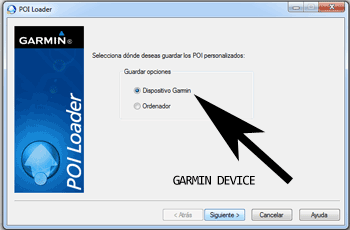
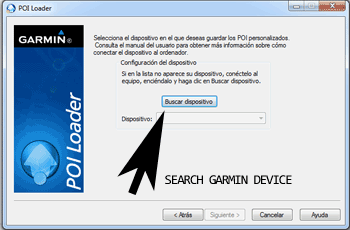
- So, as explained before, select the target folder on your hard disk which contains the unzipped files of our database. Now you can choose between Express mode and Manual mode. Select Express Mode.
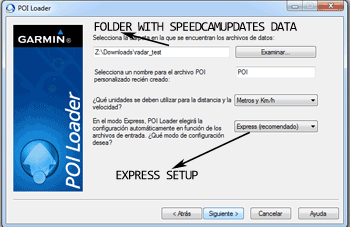
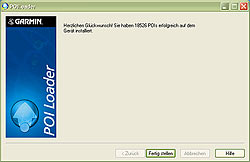
- In this mode all settings are given by POI Loader. Push Next button and all speed cameras will be installed.
In orden to transfer the speedcam database information to your Garmin nüvi 2797LMT device you have to use POI loader application. Click next link to download it.
POI Loader Software
Remember you can customize freely your download. Get access to the customer control panel and using the customization tool in order to get a customized speedcam database according to your needs. You will need this tool if your device doesn't accept the size of the new update. You can add and remove countries speedcam data to your current setup.
nüvi 2797LMT Speed Camera Update Information
The Garmin Nuvi 2797LMT provides comprehensive map coverage for North America, including the United States, Canada, and Mexico. With its City Navigator NT maps, users can expect detailed road information, points of interest, and updated navigation data. The device offers free lifetime map updates, ensuring that your routes reflect the most current road conditions and changes. Regular updates help maintain accuracy in navigation, allowing for efficient route planning and travel. This feature is essential for drivers who frequently travel or explore new areas, as it enhances the overall navigation experience by providing the latest information.
Updating the maps on your Garmin Nuvi 2797LMT is a straightforward process. Users can connect the device to a computer using a USB cable. Once connected, the Garmin Express software can be used to check for available map updates. If updates are found, they can be downloaded and installed directly onto the device. For those who prefer using an SD card, maps can also be transferred via this method. It’s important to ensure that the device has sufficient storage space for the updates, which can be managed through the settings menu.
The Garmin Nuvi 2797LMT excels in route guidance, providing clear and precise directions to help drivers navigate efficiently. The device features voice command capabilities, allowing users to input destinations hands-free, enhancing safety while driving. Additionally, the GPS includes alerts for speed cameras, helping users stay informed about potential traffic enforcement areas. This feature not only aids in compliance with speed limits but also contributes to safer driving practices. Overall, the combination of reliable route guidance and speed camera alerts makes the Nuvi 2797LMT a valuable tool for any driver.
Looking for additional GPS update information and compatible navigation systems?
GPS Update & Installation Guide