
Fiat Sedici (Bosch MMC)
In order to update your GPS device: Fiat Sedici (Bosch MMC) with the latest update, follow next instructions.
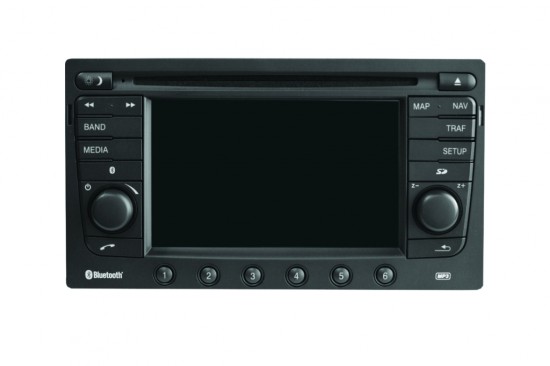
First of all, be sure you got the update file for your Fiat Sedici (Bosch MMC) device, downloaded from SpeedcamUpdates.com.
If still haven't got it, you can get it now filling the form you see on this page.
- Extract files from the SpeedcamUpdates zip package. If the file you have downloaded is not a ZIP file means the file is already decompressed, and you can continue with the next step of this installation instructions.
- Copy and paste unzipped files to an empty USB stick (formated as FAT, smaller than 1GB) into directory "/myPOIs/myPOIWarnings".
- Connect USB stick to your Fiat Sedici (Bosch MMC) navigation device.
- Click SETUP key
- Go to menu option "Navigation/Load Custom POIs"
- It will detect new files of points of interest automatically.
Remember you can customize freely your download. Get access to the customer control panel and using the customization tool in order to get a customized speedcam database according to your needs. You will need this tool if your device doesn't accept the size of the new update. You can add and remove countries speedcam data to your current setup.
Fiat Sedici (Bosch MMC) Speed Camera Update Information
The Fiat Sedici (Bosch MMC) GPS navigation system relies on an updated map database to ensure accurate routing and navigation. Regular map updates are essential as they refresh the navigation system with new and modified roads, updated speed limits, and changes in signage. Additionally, points of interest are added to enhance your driving experience. Keeping your map data current not only improves routing accuracy but can also contribute to better fuel economy. To ensure optimal performance, it is recommended to download the latest map updates periodically.
Updating the Fiat Sedici (Bosch MMC) GPS maps can be done through various methods, including USB, SD card, or DVD, depending on your navigation system's compatibility. To begin the update process, first, download the latest map files from a reliable source. If using a USB drive, ensure it is formatted correctly and has sufficient space. For SD card updates, insert the card into your computer and transfer the downloaded files. Follow the specific installation instructions provided for your navigation system to complete the update successfully.
The Fiat Sedici (Bosch MMC) GPS navigation system offers route guidance that adapts to the latest map data, ensuring you receive accurate directions. In addition to standard navigation features, the system includes a speed camera database that can be updated to alert you of speed camera locations. This feature enhances your driving safety and compliance with speed regulations. Regularly updating the speed camera database is crucial for maintaining awareness of potential speed traps and ensuring a smooth driving experience.
Looking for additional GPS update information and compatible navigation systems?
GPS Update & Installation Guide