
Audi A1 8X MMI
In order to update your GPS device: Audi A1 8X MMI with the latest update, follow next instructions.
First of all, be sure you got the update file for your Audi A1 8X MMI device, downloaded from SpeedcamUpdates.com.
If still haven't got it, you can get it now filling the form you see on this page.
- Extract files from the SpeedcamUpdates zip package. If the file you have downloaded is not a ZIP file means the file is already decompressed, and you can continue with the next step of this installation instructions.
Depending on the device version you will have to follow the installation method 1 or method 2. If you're not sure, please try first method 1, then method 2.
- Put an empty SD card into the PC card reader.
- Unzip the file downloaded from our website into the SD card
- Insert the SD card into the card reader of the Audi A1 8X MMI GPS device.
Method 1
- Click on MENU option. Then click "Setup" on the control button.
- Select the option for "system update"
- Select the storage medium on which the data is stored.
Method 2
- Select navigation menu
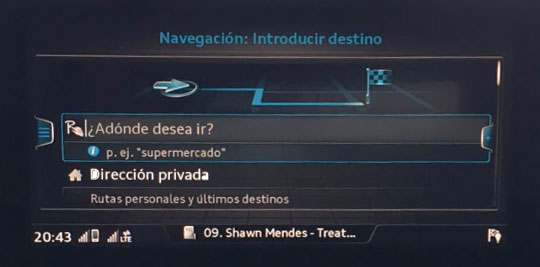
- Select special destinations

- Select special destinations MyAudi
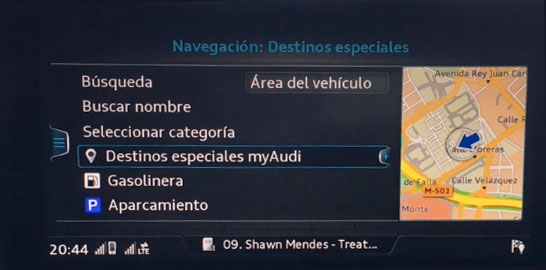
- Select: Import special destinations MyAudi
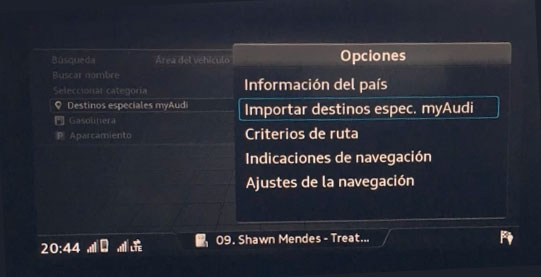
- Select: Import from SD card
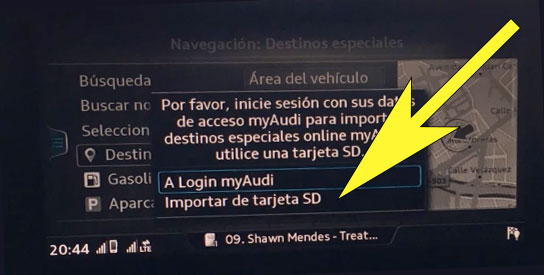
- Follow next on screen steps to finish the import procedure. Once import procedure finished you can customize your notification setup following next steps.
- Select MAP Settings. Select Map Contents (MMI)
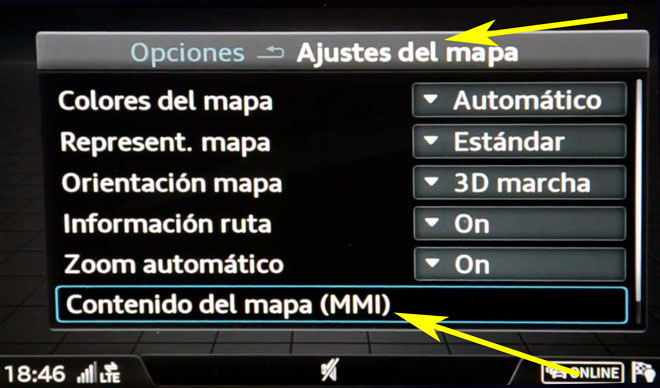
- Select myAudi Special Destinations
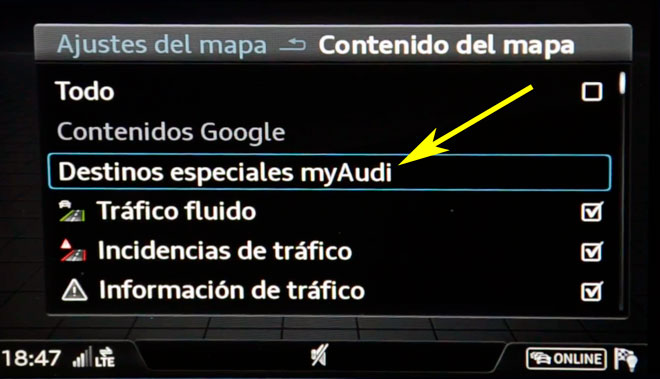
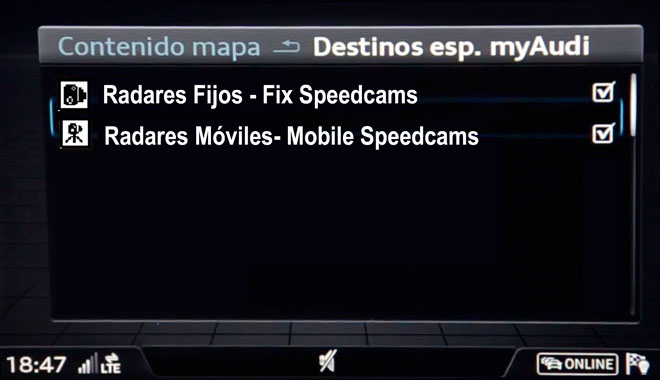
- Check all the categories you want to be shown in the map.
- Select navigation setup
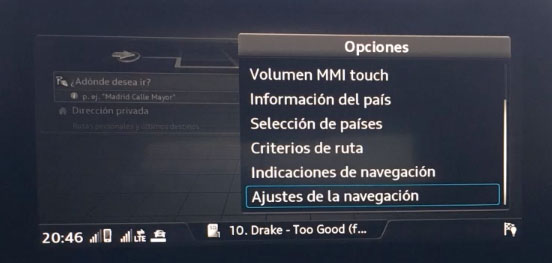
- Select show warning and enable warning tone when approaching to the speed camera
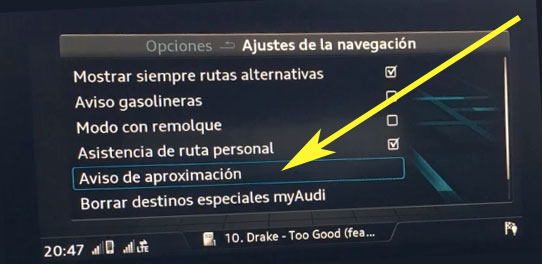
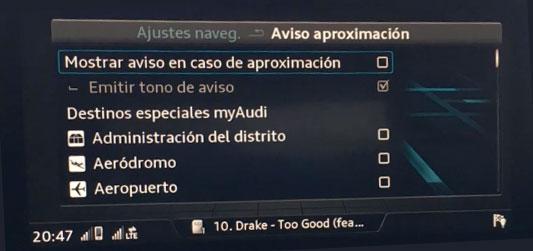
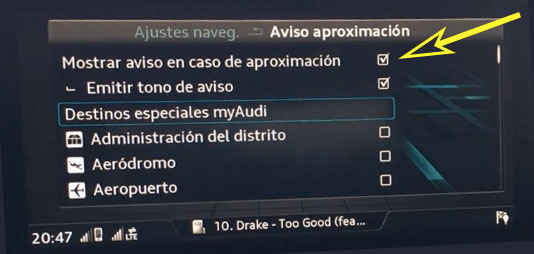
- Select maximum 10 categories you want to be warned
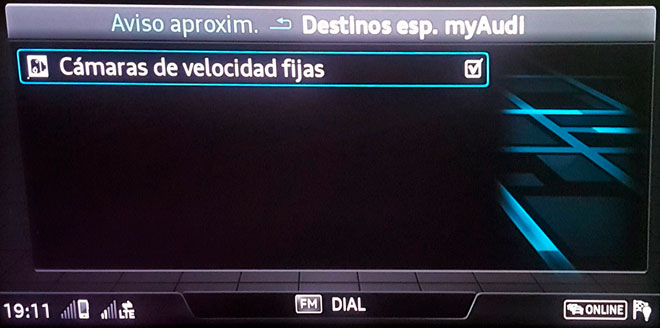
Depending on the firmware version that is installed on your device, it could be possible you can not hear alerts with sound when approaching to the speed camera. If your firmware is capable to warn you playing a sound, you can enable this feature in the points of interest setup. You can enable this feature checking that item in the items list of the map. If you can not find it you then will have to look to your reference manual. Can be located in different places depending on the firmware release.
Remember you can customize freely your download. Get access to the customer control panel and using the customization tool in order to get a customized speedcam database according to your needs. You will need this tool if your device doesn't accept the size of the new update. You can add and remove countries speedcam data to your current setup.
Audi A1 8X MMI Speed Camera Update Information
The Audi A1 8X MMI offers comprehensive map coverage, ensuring you have access to the latest road information. Regular map database updates are essential for optimal navigation performance. By swapping from the RMC system to an HDD-based MMI navigation system, you can activate navigation features and access updated maps. This process allows you to enhance your driving experience with accurate and current mapping data. Keeping your maps updated is crucial for effective route planning and avoiding outdated information, which can lead to navigation errors.
To install and update maps on your Audi A1, you will need to utilize the SD card readers available in your vehicle. Begin by downloading the latest map updates onto an SD card. Insert the card into one of the SD card slots, and follow the on-screen prompts to initiate the installation process. Ensure that your vehicle is in a stationary position during the update to avoid interruptions. Once the installation is complete, you can remove the SD card and store it safely for future updates, ensuring your navigation system remains current.
The Audi A1 8X MMI provides efficient route guidance, allowing you to navigate with ease. Simply input your destination using the touch screen interface, and the system will calculate the best route. Additionally, the navigation system can alert you to speed camera locations, helping you maintain compliance with traffic regulations. This feature enhances your driving experience by providing real-time information about potential speed traps, allowing you to adjust your speed accordingly. Utilizing these navigation features ensures a safer and more informed journey.
Looking for additional GPS update information and compatible navigation systems?
GPS Update & Installation Guide