
Zenec ZE-NC 2051
In order to update your GPS device: Zenec ZE-NC 2051 with the latest update, follow next instructions.
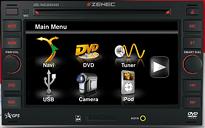
First of all, be sure you got the update file for your Zenec ZE-NC 2051 device, downloaded from SpeedcamUpdates.com.
If still haven't got it, you can get it now filling the form you see on this page.
- Extract files from the SpeedcamUpdates zip package. If the file you have downloaded is not a ZIP file means the file is already decompressed, and you can continue with the next step of this installation instructions.
- Load and install Naviextras Toolbox from Naviextras.com
- Prepare your USB memory stick with Toolbox. It should create the directories "[USB stick]/Updates/BACKUP/content/
- Copy and paste unzipped files into the speedcam folder.
- Connect the USB stick to your ZENEC unit.
Remember you can customize freely your download. Get access to the customer control panel and using the customization tool in order to get a customized speedcam database according to your needs. You will need this tool if your device doesn't accept the size of the new update. You can add and remove countries speedcam data to your current setup.
Zenec ZE-NC 2051 Speed Camera Update Information
The Zenec ZE-NC 2051 offers extensive map coverage, ensuring users have access to detailed navigation data for their journeys. Regular map database updates can be obtained through the Naviextras Internet portal, allowing users to keep their navigation system current. The 30-day Latest Map Guarantee ensures that you receive the most up-to-date map data shortly after purchase, enhancing the accuracy of your navigation experience. This feature is particularly beneficial for travelers who frequently navigate new areas, as it helps avoid outdated routes and provides reliable guidance.
Updating the Zenec ZE-NC 2051's navigation software is straightforward. Users can download updates via the Naviextras Internet portal and transfer them to the device using a USB or SD card. The process involves connecting the storage device to a computer, downloading the necessary updates, and then inserting the USB or SD card into the Zenec unit. Following the on-screen prompts will guide users through the installation process, ensuring that the navigation system remains equipped with the latest map data and software enhancements.
The Zenec ZE-NC 2051 provides precise route guidance, helping users navigate efficiently to their destinations. The system includes features such as TMC and TMC Pro receivers, which offer real-time traffic updates to optimize route planning. Additionally, the device supports speed camera alerts, enhancing driver awareness and safety. By utilizing these features, users can expect a more informed driving experience, allowing for timely adjustments to their routes based on current traffic conditions and potential hazards.
Looking for additional GPS update information and compatible navigation systems?
GPS Update & Installation Guide