
Garmin Oregon 200
In order to update your GPS device: Garmin Oregon 200 with the latest update, follow next instructions.
First of all, be sure you got the update file for your Garmin Oregon 200 device, downloaded from SpeedcamUpdates.com.
If still haven't got it, you can get it now filling the form you see on this page.
- Extract files from the SpeedcamUpdates zip package. If the file you have downloaded is not a ZIP file means the file is already decompressed, and you can continue with the next step of this installation instructions.
- Connect your Garmin Oregon 200 device using an USB cable to your PC. Now run POI Loader. Select the folder where you extracted the files before. Continue with Express Mode and finish your installation. The information will be transferred to your Garmin Oregon 200 device.
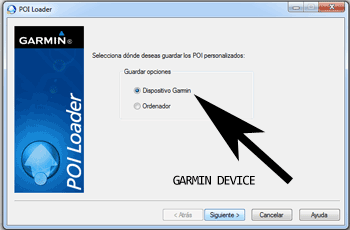
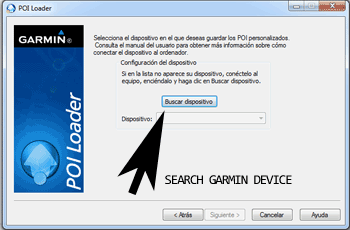
- So, as explained before, select the target folder on your hard disk which contains the unzipped files of our database. Now you can choose between Express mode and Manual mode. Select Express Mode.
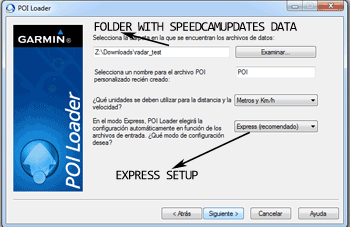
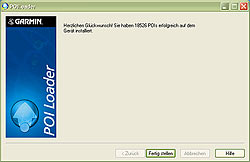
- In this mode all settings are given by POI Loader. Push Next button and all speed cameras will be installed.
In orden to transfer the speedcam database information to your Garmin Oregon 200 device you have to use POI loader application. Click next link to download it.
POI Loader Software
Remember you can customize freely your download. Get access to the customer control panel and using the customization tool in order to get a customized speedcam database according to your needs. You will need this tool if your device doesn't accept the size of the new update. You can add and remove countries speedcam data to your current setup.
Oregon 200 Speed Camera Update Information
The Garmin Oregon 200 GPS device features a comprehensive map database, including TOPO Lot 24k maps for various regions. While the Oregon 200 has been discontinued, it originally provided detailed topographic information, making it suitable for outdoor navigation. Users could benefit from regular map updates to ensure accurate terrain representation and navigation. Although the device is no longer in production, existing users should check for any available updates to enhance their navigation experience and maintain the accuracy of their maps.
Updating the Garmin Oregon 200's maps involves a straightforward process using USB or SD card installation. Users can connect the device to a computer via USB to access the Garmin software, which facilitates map updates. Alternatively, if maps are stored on an SD card, users can download updates directly to the card and then insert it back into the device. Following the prompts on the screen will guide users through the update process, ensuring they have the latest maps for their navigation needs.
The Oregon 200 offers reliable route guidance, utilizing its high-sensitivity GPS receiver to provide accurate positioning. Users can create and follow routes tailored to their outdoor activities. Additionally, while the device does not specifically mention speed camera alerts, it is essential for users to remain aware of their surroundings and adhere to local regulations during navigation. The rugged design of the Oregon 200 ensures it can withstand various outdoor conditions, making it a dependable companion for navigation in diverse environments.
Looking for additional GPS update information and compatible navigation systems?
GPS Update & Installation Guide