
MyGuide 4200 ( Software MyGuide 6.1 )
In order to update your GPS device: MyGuide 4200 ( Software MyGuide 6.1 ) with the latest update, follow next instructions.
First of all, be sure you got the update file for your MyGuide 4200 ( Software MyGuide 6.1 ) device, downloaded from SpeedcamUpdates.com.
If still haven't got it, you can get it now filling the form you see on this page.
- Extract files from the SpeedcamUpdates zip package. If the file you have downloaded is not a ZIP file means the file is already decompressed, and you can continue with the next step of this installation instructions.
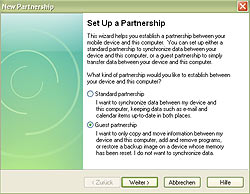
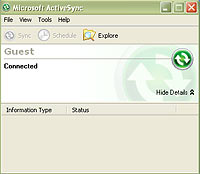
- Connect your MyGuide 4200 ( Software MyGuide 6.1 ) device to the PC over the USB cable and select Guest partnership connection via Microsoft ActiveSync. Copy the extracted file speedcams.txt to your MyGuide in the folder "My Flash Disk/MyGuide/POI/speedcam".
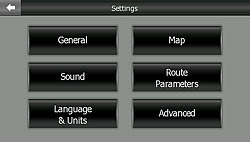
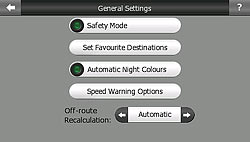
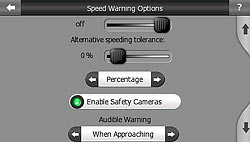
- Disconnect your MyGuide 4200 ( Software MyGuide 6.1 ) device from your PC and start the navigation system. Go to the menu Settings/General/Speed Warning Options/Enable Safety Cameras and then activate the alerts.
Remember you can customize freely your download. Get access to the customer control panel and using the customization tool in order to get a customized speedcam database according to your needs. You will need this tool if your device doesn't accept the size of the new update. You can add and remove countries speedcam data to your current setup.
MyGuide 4200 ( Software MyGuide 6.1 ) Speed Camera Update Information
The MyGuide 4200 GPS navigation device offers comprehensive map coverage for the UK and the entirety of Europe, featuring the latest 3D maps. Regular map updates ensure that users have access to the most current road information, enhancing navigation accuracy. These updates include detailed coverage of urban and rural areas, ensuring that you can navigate confidently across various terrains. The device also incorporates the latest speed camera locations, providing real-time alerts to help you stay informed and compliant with speed limits. Keeping your maps updated is essential for optimal performance and reliable navigation.
Updating the MyGuide 4200 is a straightforward process. To install map updates, connect your device to your PC using a USB cable. Once connected, launch the Naviextras Toolbox software, which will automatically scan your device for installed software and maps. Follow the prompts to download and install the latest updates. Alternatively, if your device supports SD card updates, you can download the updates directly to an SD card and then insert it into the MyGuide 4200. This ensures that your navigation system is always equipped with the latest maps and features.
The MyGuide 4200 excels in route guidance, providing clear and precise directions to help you reach your destination efficiently. The device features advanced lane indication, which assists in navigating complex intersections and highway exits. Additionally, the integration of speed camera alerts enhances your driving experience by notifying you of potential speed traps along your route. This feature not only promotes safer driving but also helps you avoid fines. By utilizing these navigation capabilities, users can enjoy a more informed and secure journey throughout the UK and Europe.
Looking for additional GPS update information and compatible navigation systems?
GPS Update & Installation Guide