
Mitac Mio 168 (GPS)
In order to update your GPS device: Mitac Mio 168 (GPS) with the latest update, follow next instructions.
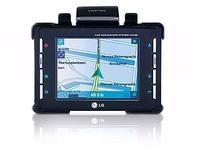
First of all, be sure you got the update file for your Mitac Mio 168 (GPS) device, downloaded from SpeedcamUpdates.com.
If still haven't got it, you can get it now filling the form you see on this page.
- Extract files from the SpeedcamUpdates zip package. If the file you have downloaded is not a ZIP file means the file is already decompressed, and you can continue with the next step of this installation instructions.
- Connect your Mitac Mio 168 (GPS) device to your PC using Microsoft Active Sync
- Copy the unzipped files into the folder "./DestinatorApps/Destinator/Common/Favorites" or into the folder "./DestinatorApps/Destinator/UserData/Favorites" if you're user of Destinator 6.
- Once copying files is finished, disconnect your Mitac Mio 168 (GPS) device from Active Sync and run Destinator application.
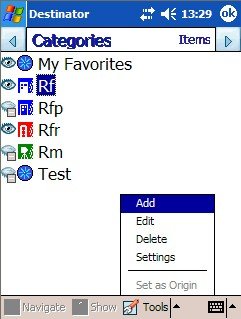
- In the Manage Favorites option enable the icons for the different speedcam.
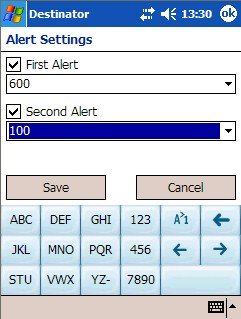
- Finally check the option to be warned first time and second time. Fill in the form for the first option, "400". For the second one option insert "100". The meaning of both values represent the moment when you'll receive a warning from your GPS depending on the distance between your car and the speedcam.
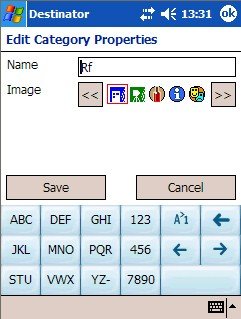
Remember you can customize freely your download. Get access to the customer control panel and using the customization tool in order to get a customized speedcam database according to your needs. You will need this tool if your device doesn't accept the size of the new update. You can add and remove countries speedcam data to your current setup.
Mitac Mio 168 (GPS) Speed Camera Update Information
The Mitac Mio 168 GPS navigation device offers comprehensive map coverage, ensuring users can navigate various terrains with confidence. Regular map database updates are essential for maintaining accuracy in navigation. These updates can enhance the device's performance by providing the latest road information, points of interest, and changes in traffic patterns. Users should regularly check for updates to ensure they have the most current maps available, which can significantly improve route planning and overall navigation experience.
Updating the maps on the Mitac Mio 168 is a straightforward process. Users can utilize the SD/MMC card slot for easy installation of map updates. By downloading the latest map files onto a compatible SD card via a computer, users can insert the card into the Mio 168 to access the new maps. Additionally, the device supports USB connectivity, allowing for direct updates from a computer. This workflow ensures that users can keep their navigation system current without hassle.
The Mitac Mio 168 excels in route guidance, providing clear directions to help users reach their destinations efficiently. The device utilizes a SiRF chipset to lock onto GPS satellites, ensuring accurate positioning for effective navigation. Users can also benefit from speed camera alerts, which enhance safety by notifying them of potential speed traps along their routes. This feature, combined with reliable route guidance, makes the Mio 168 a practical choice for users seeking dependable navigation assistance.
Looking for additional GPS update information and compatible navigation systems?
GPS Update & Installation Guide