
Mercedes Clase M (W166)
In order to update your GPS device: Mercedes Clase M (W166) with the latest update, follow next instructions.

First of all, be sure you got the update file for your Mercedes Clase M (W166) device, downloaded from SpeedcamUpdates.com.
If still haven't got it, you can get it now filling the form you see on this page.
- Extract files from the SpeedcamUpdates zip package. If the file you have downloaded is not a ZIP file means the file is already decompressed, and you can continue with the next step of this installation instructions.
- Use an empty sd-card formatted as FAT32.
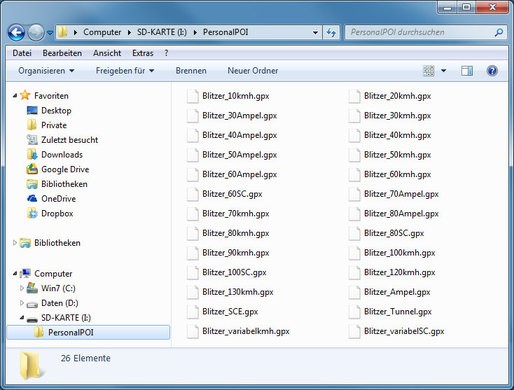
- Copy and paste all unzipped GPX files into the directory "sd-card/PersonalPOI" of your sd-card.
- Take a look into settings menu for importing custom POIs.
- Just for NTG 4.5 devices. In order to import your speed cameras into your Mercedes COMAND Online NTG 4.5 gps device, you have to press button Guide and then select Personal POIs.
- Just for NT 5.0 devices. In order to import your speed cameras into your Mercedes COMAND Online NTG 5.X gps device, you have to press button NAVI. Then select Options. And then select Personal POIs.
There is no choice to copy speed camera information into the hard disk of your Mercedes Clase M (W166) gps device. The SD-card has to remain inserted while driving
There is a limit of 30.000 speed cameras that can be stored in the SD-Card. Because of this limitation we suggest to choose the countries you want. You can do this through the customer control panel using the customization tool.
Remember you can customize freely your download. Get access to the customer control panel and using the customization tool in order to get a customized speedcam database according to your needs. You will need this tool if your device doesn't accept the size of the new update. You can add and remove countries speedcam data to your current setup.
Mercedes Clase M (W166) Speed Camera Update Information
The Mercedes ML-Class W166, equipped with the Garmin MAP PILOT, offers extensive map coverage for the UK and all of Europe. Regular map database updates ensure that you have access to the latest road information, points of interest, and navigation features. Keeping your maps current is essential for optimal route planning and avoiding outdated information. By updating your map data, you can enhance your driving experience with improved accuracy and reliability, ensuring you reach your destination efficiently.
To update the navigation maps for your Mercedes ML-Class W166, you will need an SD card. Begin by downloading the latest map updates from the official Garmin website. Once downloaded, insert the SD card into your computer and transfer the updated files. After the transfer is complete, safely eject the SD card and insert it back into the vehicle’s COMAND system. The system will recognize the new maps, and you can follow the on-screen prompts to complete the installation process, ensuring your navigation system is up to date.
The Garmin MAP PILOT in the Mercedes ML-Class W166 provides precise route guidance, helping you navigate efficiently to your destination. The system offers real-time directions, including lane guidance and estimated arrival times. Additionally, it can alert you to speed camera locations, enhancing your awareness while driving. Utilizing these features allows for a safer and more informed driving experience, ensuring you stay on track and adhere to speed limits throughout your journey.
Looking for additional GPS update information and compatible navigation systems?
GPS Update & Installation Guide