
Mercedes Clase M (W164)
In order to update your GPS device: Mercedes Clase M (W164) with the latest update, follow next instructions.

First of all, be sure you got the update file for your Mercedes Clase M (W164) device, downloaded from SpeedcamUpdates.com.
If still haven't got it, you can get it now filling the form you see on this page.
- Extract files from the SpeedcamUpdates zip package. If the file you have downloaded is not a ZIP file means the file is already decompressed, and you can continue with the next step of this installation instructions.
- Use an empty sd-card formatted as FAT32.
- Copy and paste all unzipped GPX files into the directory "sd-card/PersonalPOI" of your sd-card.
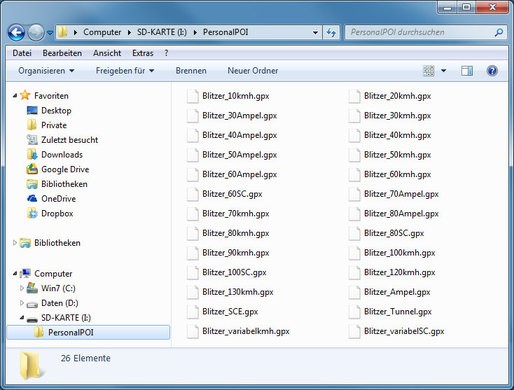
- Take a look into settings menu for importing custom POIs.
- Just for NTG 4.5 devices. In order to import your speed cameras into your Mercedes COMAND Online NTG 4.5 gps device, you have to press button Guide and then select Personal POIs.
- Just for NT 5.0 devices. In order to import your speed cameras into your Mercedes COMAND Online NTG 5.X gps device, you have to press button NAVI. Then select Options. And then select Personal POIs.
There is no choice to copy speed camera information into the hard disk of your Mercedes Clase M (W164) gps device. The SD-card has to remain inserted while driving
There is a limit of 30.000 speed cameras that can be stored in the SD-Card. Because of this limitation we suggest to choose the countries you want. You can do this through the customer control panel using the customization tool.
Remember you can customize freely your download. Get access to the customer control panel and using the customization tool in order to get a customized speedcam database according to your needs. You will need this tool if your device doesn't accept the size of the new update. You can add and remove countries speedcam data to your current setup.
Mercedes Clase M (W164) Speed Camera Update Information
The Mercedes Clase M (W164) GPS navigation system offers comprehensive map coverage, ensuring you have access to the latest road information. Regular map database updates are essential for maintaining accurate navigation. These updates can include new roads, changes in traffic patterns, and updated points of interest, which are crucial for effective route planning. Keeping your maps current enhances your driving experience, allowing for more efficient travel and reducing the likelihood of encountering outdated information. With the ability to support popular navigation apps, you can ensure that your GPS remains reliable and up-to-date.
Updating the GPS maps on your Mercedes Clase M (W164) is a straightforward process. You can utilize a USB drive or SD card to install the latest map updates. Simply download the required map files from a trusted source onto your USB or SD card. Insert the device into the navigation system, and follow the on-screen prompts to initiate the update. This method allows for easy access to the latest maps without needing an internet connection, ensuring that your navigation system remains functional and accurate.
The navigation system in the Mercedes Clase M (W164) provides precise route guidance, helping you navigate efficiently to your destination. It offers turn-by-turn directions, ensuring you stay on the correct path. Additionally, the system can alert you to speed camera locations, enhancing your awareness while driving. This feature is particularly useful for maintaining safe driving habits and avoiding potential fines. By utilizing these navigation capabilities, you can enhance your overall driving experience and ensure you reach your destination with confidence.
Looking for additional GPS update information and compatible navigation systems?
GPS Update & Installation Guide