
Mercedes Clase CLA ( Garmin Map Pilot )
In order to update your GPS device: Mercedes Clase CLA ( Garmin Map Pilot ) with the latest update, follow next instructions.
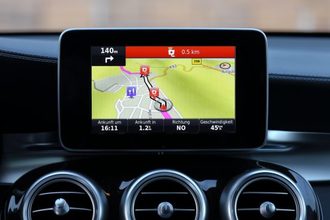
First of all, be sure you got the update file for your Mercedes Clase CLA ( Garmin Map Pilot ) device, downloaded from SpeedcamUpdates.com.
If still haven't got it, you can get it now filling the form you see on this page.
- Extract files from the SpeedcamUpdates zip package. If the file you have downloaded is not a ZIP file means the file is already decompressed, and you can continue with the next step of this installation instructions.
- Take the SD card from your GPS device Mercedes Clase CLA ( Garmin Map Pilot ) and insert it into your computer, in an SD card reader.
- Run POILoader software in your computer. In the first screen of POI Loader select store the data in your computer instead device. Now select the folder where you extracted the contents of the zip file downloaded. Choose a name for the file will be build, for example: POI. Select the destination folder too, for example in your Desktop. Select Express Mode, and wait for the application finish copying a new binary file for your Mercedes Clase CLA ( Garmin Map Pilot ) device.
- Once completed, copy the resultant file named POI which will be in your Desktop into the SD card, in an existant folder named POI. Usually it should be located in the folder Garmin.
- Last step. Remove the SD card from your computer with security, and insert it into your GPS device Mercedes Clase CLA ( Garmin Map Pilot ). New file will be used to show your speed cameras in the map.
In orden to transfer the speedcam database information to your Mercedes Clase CLA ( Garmin Map Pilot ) device you have to use POI loader application. Click next link to download it.
POI Loader Software POILoader is available for Windows and Mac.
If you see some warnings at the end of the procedure with "POILoader", it means the audio files were not converted as POILoader requires. You can ignore this information if what you want is that your GPS device plays the default sounds to warn you. If,on the contrary, you want to use the sound included in the package you've downloaded from this site, then POILoader needs the audio application named sox. You have download SOX for MacOS, Windows or Linux from this link SOX Audio Converter. After you download it, you have to install it in the same folder where POILoader was installed before. You don't need to do anything else. If POILoader finds sox.exe in the same folder it will use it to add wav files to the speed cameras package.
In latest releases of the device Mercedes Clase CLA ( Garmin Map Pilot ), you won't be able to see any speed camera icon on the map. Garmin has explained that this issue happens because there is a Mercedes specification which is to suppress all external icons which are not part of the map. However, when you drive near the speed camera, a red bar appears at top of the screen. When you pass the speed camera, you will see a small icon at the top left.
If you see chinese characters in the screen is because there is a bug in the firmware v6.1 of your Mercedes Clase CLA ( Garmin Map Pilot ) gps device. You can use the next workaround. Delete the fonts for chinese and other asian languages located in your SD card in the folder named: Garmin/fonts. They're named 006-0952-001, 006-0952-002 and 006-0952-003, 006-D4436-01, 006-D4436-02, 006-D4436-03, 006-D4436-06. Do a backup of those files to restore them again in case a new firmware be released.
Remember you can customize freely your download. Get access to the customer control panel and using the customization tool in order to get a customized speedcam database according to your needs. You will need this tool if your device doesn't accept the size of the new update. You can add and remove countries speedcam data to your current setup.
Mercedes Clase CLA ( Garmin Map Pilot ) Speed Camera Update Information
The Mercedes A2189068403 SD card is essential for maintaining accurate navigation with the Garmin Map Pilot system. It provides comprehensive map coverage, ensuring that users have access to the latest road networks and points of interest. Regular map database updates are crucial for optimal navigation performance, as they enhance route accuracy and help drivers avoid outdated information. Keeping the maps current allows for better planning and execution of trips, ensuring that users can navigate efficiently across various regions.
To install or update the Garmin Map Pilot navigation system, users must insert the A2189068403 SD card into the designated slot in their Mercedes-Benz vehicle. The update process typically involves downloading the latest map files from a compatible source, which can then be transferred to the SD card via a computer. Once the updated card is inserted back into the vehicle, the system will recognize the new maps, allowing for seamless navigation. It is important to follow the specific instructions provided by Mercedes-Benz for a successful update.
The Garmin Map Pilot system offers precise route guidance, helping drivers navigate efficiently to their destinations. It provides turn-by-turn directions, ensuring that users stay on the correct path. Additionally, the system can alert drivers to speed camera locations, enhancing safety and compliance with traffic regulations. By utilizing the latest map updates, the Garmin Map Pilot ensures that route guidance remains accurate, allowing for a smoother driving experience and reducing the likelihood of unexpected detours.
Looking for additional GPS update information and compatible navigation systems?
GPS Update & Installation Guide