
Garmin DriveSmart 55 Live Traffic
In order to update your GPS device: Garmin DriveSmart 55 Live Traffic with the latest update, follow next instructions.
First of all, be sure you got the update file for your Garmin DriveSmart 55 Live Traffic device, downloaded from SpeedcamUpdates.com.
If still haven't got it, you can get it now filling the form you see on this page.
- Extract files from the SpeedcamUpdates zip package. If the file you have downloaded is not a ZIP file means the file is already decompressed, and you can continue with the next step of this installation instructions.
- Connect your Garmin DriveSmart 55 Live Traffic device using an USB cable to your PC. Now run POI Loader. Select the folder where you extracted the files before. Continue with Express Mode and finish your installation. The information will be transferred to your Garmin DriveSmart 55 Live Traffic device.
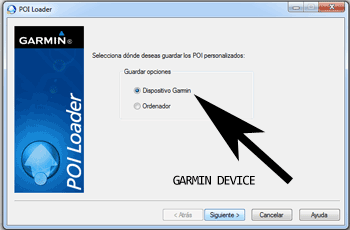
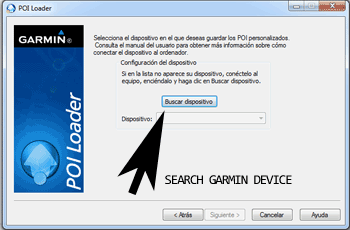
- So, as explained before, select the target folder on your hard disk which contains the unzipped files of our database. Now you can choose between Express mode and Manual mode. Select Express Mode.
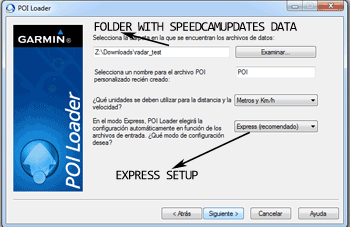
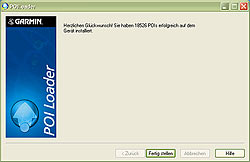
- In this mode all settings are given by POI Loader. Push Next button and all speed cameras will be installed.
In orden to transfer the speedcam database information to your Garmin DriveSmart 55 Live Traffic device you have to use POI loader application. Click next link to download it.
POI Loader Software
Remember you can customize freely your download. Get access to the customer control panel and using the customization tool in order to get a customized speedcam database according to your needs. You will need this tool if your device doesn't accept the size of the new update. You can add and remove countries speedcam data to your current setup.
DriveSmart 55 Live Traffic Speed Camera Update Information
The Garmin DriveSmart 55 Live Traffic features comprehensive map coverage, ensuring you have access to detailed road information across various regions. Regular map database updates are essential for maintaining accurate navigation. These updates include new roads, changes in traffic patterns, and updated points of interest, which enhance your driving experience. Keeping your maps current allows for more efficient route planning and helps avoid outdated information that could lead to navigation errors. Users can easily check for updates through the device interface, ensuring they always have the latest maps at their fingertips.
Updating the Garmin DriveSmart 55 is a straightforward process. Users can connect the device to a computer via USB to access the Garmin Express application, which facilitates map updates. Once connected, the software will prompt users to download the latest map updates available for their device. Alternatively, if the device supports external memory storage, users can also utilize an SD card for map updates. This method allows for easy transfer of updated maps directly to the GPS navigator, ensuring that you have the most accurate navigation data available.
The Garmin DriveSmart 55 provides precise route guidance, utilizing its advanced GPS technology to deliver turn-by-turn directions. This feature ensures that drivers can navigate confidently, even in unfamiliar areas. Additionally, the device includes speed camera alerts, which notify users of upcoming speed cameras along their route. This functionality helps promote safe driving habits and can assist in avoiding potential fines. By integrating real-time traffic information, the DriveSmart 55 can suggest alternate routes to bypass congestion, further enhancing the navigation experience.
Looking for additional GPS update information and compatible navigation systems?
GPS Update & Installation Guide