
Blaupunkt TravelPilot 700
In order to update your GPS device: Blaupunkt TravelPilot 700 with the latest update, follow next instructions.
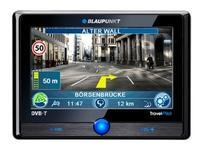
First of all, be sure you got the update file for your Blaupunkt TravelPilot 700 device, downloaded from SpeedcamUpdates.com.
If still haven't got it, you can get it now filling the form you see on this page.
- Extract files from the SpeedcamUpdates zip package. If the file you have downloaded is not a ZIP file means the file is already decompressed, and you can continue with the next step of this installation instructions.
- Connect your Blaupunkt TravelPilot 700 device to your PC using USB cable. When your PC detect a new external storage drive, open the folder "./TravelPilot/Navigation/ownPOIs."
- In this folder you will see two subfolders called "Hints" and "Icons" . Delete the first one ( Hints) and delete all files with extension "bmp" from the second one (Icons). Now copy all files with extension bmp extracted from the SpeedcamUpdates zip file in the Icons folder.
- Now copy all files with extension "asc", you extracted before, into the folder "./TravelPilot/Navigation/ownPOIs".
- Disconnect your Blaupunkt TravelPilot 700 device from your PC. Then reboot it. After the Blaupunkt TravelPilot 700 device has booted, click in menu "/map settings/points of interest/my POI/speedcam" and activate the acoustic and visual alert.
In order to install the speedcam information into your Blaupunkt TravelPilot 700 device you have to download TPAssist application. Click the next link to download.
TPAssist Software.BlauPunkt Property. Not available on this site.
Remember you can customize freely your download. Get access to the customer control panel and using the customization tool in order to get a customized speedcam database according to your needs. You will need this tool if your device doesn't accept the size of the new update. You can add and remove countries speedcam data to your current setup.
Blaupunkt TravelPilot 700 Speed Camera Update Information
The Blaupunkt TravelPilot 700 offers extensive map coverage, ensuring that users have access to detailed and accurate navigation across various regions. Regular map database updates are crucial for maintaining the reliability of your GPS navigation system. These updates incorporate the latest road changes, new points of interest, and updated traffic regulations, allowing for optimal route planning. Users can expect to receive timely updates that enhance the overall navigation experience, ensuring that the TravelPilot 700 remains a dependable companion on the road.
Updating the Blaupunkt TravelPilot 700 is a straightforward process that utilizes USB or SD card installation. Users can download the latest map updates from the Blaupunkt website onto a USB drive or SD card. Once the updates are downloaded, simply insert the USB or SD card into the device, and follow the on-screen instructions to complete the installation. This user-friendly workflow ensures that your navigation system is always equipped with the most current maps, enhancing your driving experience.
The Blaupunkt TravelPilot 700 excels in route guidance, providing clear and precise directions to help users reach their destinations efficiently. The system incorporates real-time traffic sign recognition, which aids in navigating complex road environments. Additionally, the TravelPilot 700 includes features for speed camera alerts, helping drivers stay informed about speed limits and avoid potential fines. This combination of route guidance and safety features makes the TravelPilot 700 a practical choice for navigating both familiar and new routes.
Looking for additional GPS update information and compatible navigation systems?
GPS Update & Installation Guide