
Alpine X800D S906
In order to update your GPS device: Alpine X800D S906 with the latest update, follow next instructions.

First of all, be sure you got the update file for your Alpine X800D S906 device, downloaded from SpeedcamUpdates.com.
If still haven't got it, you can get it now filling the form you see on this page.
- Extract files from the SpeedcamUpdates zip package. If the file you have downloaded is not a ZIP file means the file is already decompressed, and you can continue with the next step of this installation instructions.
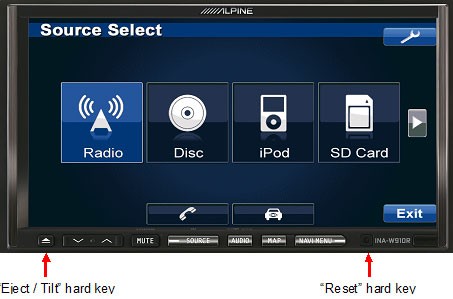
- Power the unit on and insert the SD card into INA-W910R. The SD card slot is accessible by pressing the "Eject/Tilt” hard key. The "Eject/Tilt” hard key is located as indicated below. Then press the “Open” soft key.
- Reset INA-W910R to initialize the update. The “Reset” hard key is located as indicated below. Use a pencil to press the “Reset” hard key.
- The Update is finished once the popup message “Navigation Update Successful” is displayed. Press the “OK” soft key.
- The update process might take a few minutes. Please wait until you see the confirmation screen.
Remember you can customize freely your download. Get access to the customer control panel and using the customization tool in order to get a customized speedcam database according to your needs. You will need this tool if your device doesn't accept the size of the new update. You can add and remove countries speedcam data to your current setup.
Alpine X800D S906 Speed Camera Update Information
The Alpine X800D-S906 features extensive map coverage tailored for the Mercedes Sprinter S906, ensuring accurate navigation across various terrains. Regular map database updates are essential for maintaining the reliability of your navigation system. Users can access high-resolution maps that include live traffic updates, enhancing route planning and travel efficiency. The system also provides detailed information on fixed speed and red light camera locations, allowing drivers to stay informed and compliant with traffic regulations. Keeping your maps updated is crucial for optimal performance, especially in areas where road conditions may change frequently.
Updating the navigation maps on the Alpine X800D-S906 is a straightforward process. Users can install updates via USB or SD card, allowing for easy access to the latest map data. To initiate the update, download the necessary files from the official Alpine website onto a USB drive or SD card. Insert the device into the X800D-S906, and follow the on-screen prompts to complete the installation. This method ensures that your navigation system remains current, providing you with the most accurate routes and information available.
The Alpine X800D-S906 offers precise route guidance, ensuring drivers can navigate efficiently to their destinations. The system's advanced algorithms facilitate fast route calculation, adapting to real-time traffic conditions. Additionally, the built-in alerts for fixed speed and red light cameras enhance safety by notifying drivers of potential hazards along their route. This feature is particularly useful for maintaining compliance with speed limits and avoiding fines. By leveraging these capabilities, users can experience a more informed and secure driving experience.
Looking for additional GPS update information and compatible navigation systems?
GPS Update & Installation Guide