
Alpine INE-W920R
In order to update your GPS device: Alpine INE-W920R with the latest update, follow next instructions.
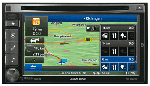
First of all, be sure you got the update file for your Alpine INE-W920R device, downloaded from SpeedcamUpdates.com.
If still haven't got it, you can get it now filling the form you see on this page.
- Extract files from the SpeedcamUpdates zip package. If the file you have downloaded is not a ZIP file means the file is already decompressed, and you can continue with the next step of this installation instructions.
- The installation procedure has three main steps. Prepare your MicroSD memory card. Gathering information from your Alpine INE-W920R device. And finally the installation of the speedcam database.
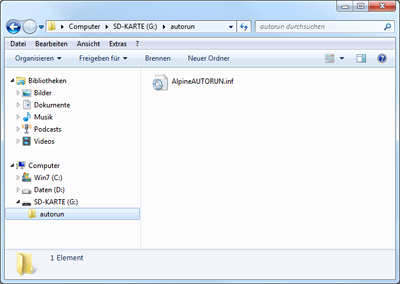
- Plug a MicroSD card formatted in FAT or FAT32 (Do not use NTFS) into your PC. Then copy the folder named autorun in the root folder of your MicroSD memory card.
- Extract the MicroSD card from your PC and go to your car. Remove the detachable faceplate to access the MicroSD card slot. Plug in the MicroSD card into the Alpine INE-W920R. Apply the detachable faceplate, and turn on your Alpine INE-W920R. Change to ignition position in the car.
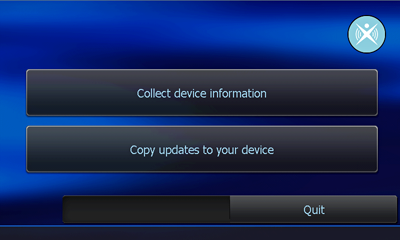
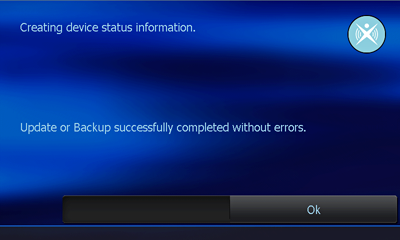
- Synctool starts up. Press the button "Collect device information". Once the procedure has finished press OK button. Then press Quit and confirm your choice with Yes.
- Remove your MicroSD card from the Alpine INE-W920R. Alpine INE-W920R could restart itself automatically.
- Plug your MicroSD card into your PC again. Copy the folder identified as BACKUP, that you extracted before, in the autorun folder of your MicroSD card. Then back to your car again, and repeat the procedure to plug in your MicroSD card into your Alpine INE-W920R.
- Synctool starts up. Press the button “Copy updates to your device” this time. Confirm with Yes to start the procedure. When finished press Quit and confirm with Yes. Your Alpine INE-W920R has been updated!.
Remember you can customize freely your download. Get access to the customer control panel and using the customization tool in order to get a customized speedcam database according to your needs. You will need this tool if your device doesn't accept the size of the new update. You can add and remove countries speedcam data to your current setup.
Alpine INE-W920R Speed Camera Update Information
The Alpine INE-W920R provides extensive map coverage across nearly all European countries, ensuring that users have access to detailed navigation data. Regular map database updates are essential for maintaining accurate routing and navigation. Users can benefit from free map updates, which enhance the device's functionality by incorporating the latest road changes, points of interest, and 3D landmarks. Keeping the map database current is crucial for effective navigation, as it allows for improved route planning and helps avoid outdated information that could lead to navigation errors.
To install and update maps on the Alpine INE-W920R, users can utilize USB or SD card methods. First, download the latest map updates from the official Alpine website onto a USB drive or SD card. Insert the USB or SD card into the device's designated port. The INE-W920R will recognize the update files and prompt the user to initiate the installation process. Following the on-screen instructions will ensure a smooth update workflow, allowing users to keep their navigation system current with minimal effort.
The Alpine INE-W920R offers precise route guidance, helping users navigate efficiently to their destinations. The device features advanced address input capabilities, allowing for quick and accurate entry of locations. Additionally, the INE-W920R includes functionality for speed camera alerts, providing users with timely notifications to enhance driving safety. This feature is particularly useful for maintaining compliance with speed limits and avoiding potential fines. Overall, the navigation system is designed to support users in their journey with reliable and timely guidance.
Looking for additional GPS update information and compatible navigation systems?
GPS Update & Installation Guide