
Garmin nüvi 3760T
In order to update your GPS device: Garmin nüvi 3760T with the latest update, follow next instructions.
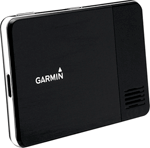
First of all, be sure you got the update file for your Garmin nüvi 3760T device, downloaded from SpeedcamUpdates.com.
If still haven't got it, you can get it now filling the form you see on this page.
- Extract files from the SpeedcamUpdates zip package. If the file you have downloaded is not a ZIP file means the file is already decompressed, and you can continue with the next step of this installation instructions.
- Connect your Garmin nüvi 3760T device using an USB cable to your PC. Now run POI Loader. Select the folder where you extracted the files before. Continue with Express Mode and finish your installation. The information will be transferred to your Garmin nüvi 3760T device.
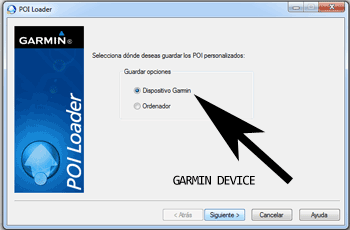
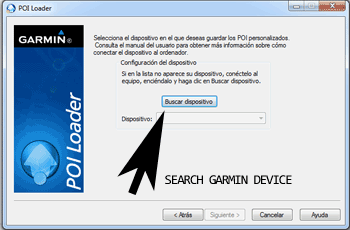
- So, as explained before, select the target folder on your hard disk which contains the unzipped files of our database. Now you can choose between Express mode and Manual mode. Select Express Mode.
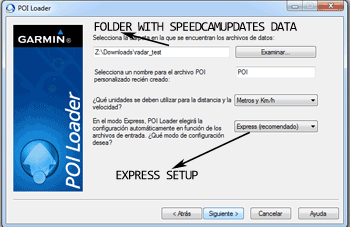
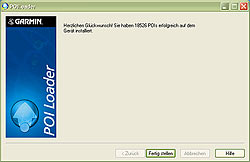
- In this mode all settings are given by POI Loader. Push Next button and all speed cameras will be installed.
In orden to transfer the speedcam database information to your Garmin nüvi 3760T device you have to use POI loader application. Click next link to download it.
POI Loader Software
Remember you can customize freely your download. Get access to the customer control panel and using the customization tool in order to get a customized speedcam database according to your needs. You will need this tool if your device doesn't accept the size of the new update. You can add and remove countries speedcam data to your current setup.
nüvi 3760T Speed Camera Update Information
The Garmin nuvi 3760T offers extensive map coverage, including detailed maps for the UK, Ireland, Eastern and Western Europe, and North America (USA and Canada). Regular map updates are essential to ensure accurate navigation and to benefit from the latest road changes and points of interest. Users can purchase and download updated maps through Garmin's official channels, ensuring that their device remains equipped with the most current information for efficient travel. Keeping your maps updated enhances the overall navigation experience, allowing for better route planning and improved accuracy during journeys.
Updating the Garmin nuvi 3760T maps can be done easily via USB or SD card. To initiate the update, connect the device to a computer using a USB cable or insert an SD card containing the map files. Utilize Garmin Express to manage the update process, which will guide you through downloading and installing the latest maps. If you encounter issues with map visibility, check the "My Maps" section in the settings to disable any recently added third-party maps that may interfere with the official updates. This ensures a smooth installation and optimal performance.
The Garmin nuvi 3760T provides reliable route guidance, featuring turn-by-turn directions that help users navigate efficiently. The device also includes speed camera alerts, enhancing safety by notifying drivers of potential speed traps along their route. This feature is particularly useful for maintaining compliance with speed limits and avoiding fines. By utilizing the nuvi 3760T's navigation capabilities, users can confidently explore new areas while receiving timely updates on their route and any relevant traffic conditions.
Looking for additional GPS update information and compatible navigation systems?
GPS Update & Installation Guide