
Volkswagen Discover Pro ( Gen. 2 )
In order to update your GPS device: Volkswagen Discover Pro ( Gen. 2 ) with the latest update, follow next instructions.

First of all, be sure you got the update file for your Volkswagen Discover Pro ( Gen. 2 ) device, downloaded from SpeedcamUpdates.com.
If still haven't got it, you can get it now filling the form you see on this page.
- Extract files from the SpeedcamUpdates zip package. If the file you have downloaded is not a ZIP file means the file is already decompressed, and you can continue with the next step of this installation instructions.
- Select the "NAV" tab
- Insert the SD card containing the downloaded and unzipped data in slot 2 of the GPS Device
- Select "Setup"
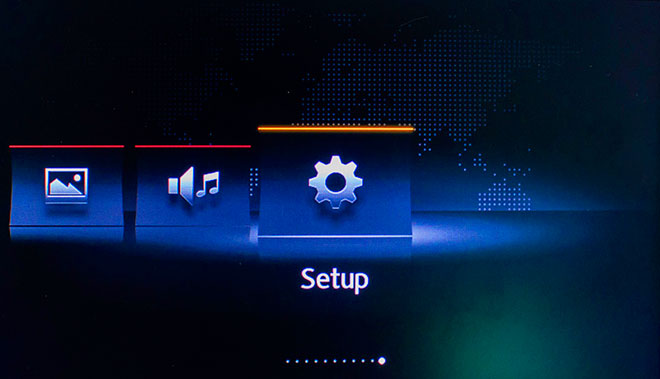
- Select "System Information"
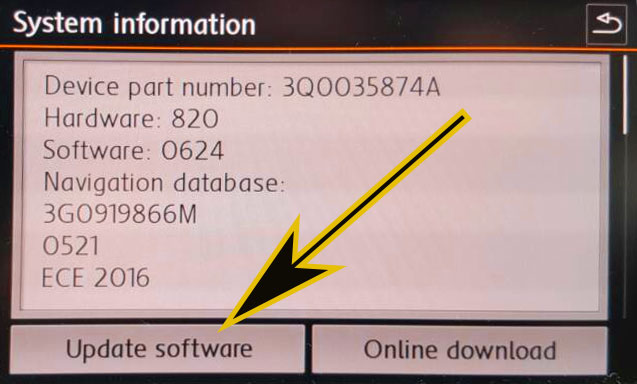
- Select "Update my POI"
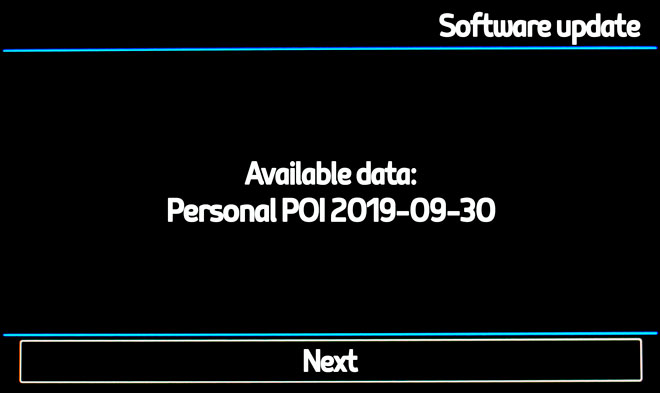
- When "Software Update Available" is shown on the screen, you have to select Update and Next
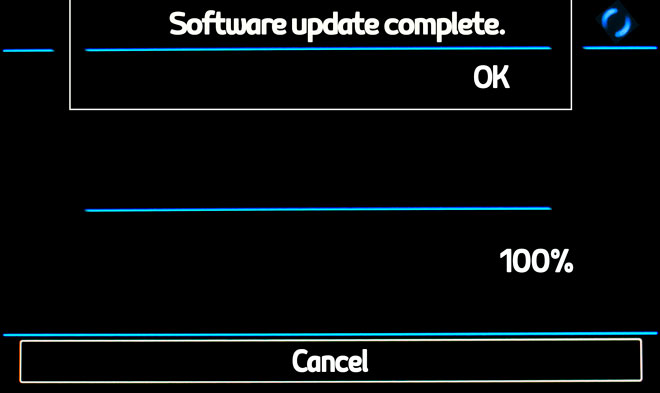
- When import procedure has finished then return to NAV
- Select "Map"
- Select "Show POI"
- Select "Show Categories"
- Scroll down till I see Speedcameras and tick them (mark with ?V?-sign).
- The cameras will be shown on the map. When you approach to the camera a weak warning sound is played. This could happen or not depending on the models.
Remember you can customize freely your download. Get access to the customer control panel and using the customization tool in order to get a customized speedcam database according to your needs. You will need this tool if your device doesn't accept the size of the new update. You can add and remove countries speedcam data to your current setup.
Volkswagen Discover Pro ( Gen. 2 ) Speed Camera Update Information
The Volkswagen Discover Pro (Gen. 2) offers extensive map coverage, ensuring you have access to the latest navigation data for your region. Regular map database updates are essential for maintaining accurate routing and traffic information. These updates enhance your driving experience by providing the most current road layouts, points of interest, and traffic regulations. To ensure optimal performance, it is recommended to check for updates periodically, as this will help you navigate efficiently and avoid outdated information that could lead to delays or detours.
Updating the maps on your Volkswagen Discover Pro is a straightforward process. You can utilize two SD card slots for map updates, allowing for easy installation. First, download the latest map updates from the official Volkswagen website onto an SD card. Insert the card into the designated slot in your vehicle's infotainment system. Follow the on-screen prompts to initiate the update process. Ensure that your vehicle is parked and the ignition is on during the update to prevent any interruptions. Once completed, your navigation system will be equipped with the latest map data.
The Discover Pro navigation system provides precise route guidance, ensuring you reach your destination efficiently. It offers real-time navigation information, including traffic updates and alternative route suggestions. Additionally, the system can alert you to speed camera locations, helping you maintain compliance with speed limits. This feature enhances your driving experience by promoting safety and awareness on the road. By utilizing the latest map updates, you can ensure that the route guidance remains accurate and reliable, allowing for a smoother journey.
Looking for additional GPS update information and compatible navigation systems?
GPS Update & Installation Guide