
Zenec ZE NC 4110
In order to update your GPS device: Zenec ZE NC 4110 with the latest update, follow next instructions.
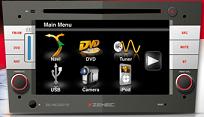
First of all, be sure you got the update file for your Zenec ZE NC 4110 device, downloaded from SpeedcamUpdates.com.
If still haven't got it, you can get it now filling the form you see on this page.
- Extract files from the SpeedcamUpdates zip package. If the file you have downloaded is not a ZIP file means the file is already decompressed, and you can continue with the next step of this installation instructions.
- Load and install Naviextras Toolbox from Naviextras.com
- Prepare your USB memory stick with Toolbox. It should create the directories "[USB stick]/Updates/BACKUP/content/
- Copy and paste unzipped files into the speedcam folder.
- Connect the USB stick to your ZENEC unit.
Remember you can customize freely your download. Get access to the customer control panel and using the customization tool in order to get a customized speedcam database according to your needs. You will need this tool if your device doesn't accept the size of the new update. You can add and remove countries speedcam data to your current setup.
Zenec ZE NC 4110 Speed Camera Update Information
The Zenec ZE NC 4110 offers comprehensive map coverage, ensuring you have access to the latest road information. To keep your navigation experience accurate, regular map database updates are essential. These updates can be easily downloaded from the Naviextras Internet portal, which provides the latest map data and system updates. Additionally, the 30-day Latest Map Guarantee ensures that you receive the most current maps shortly after purchasing your device, allowing for optimal navigation performance and route accuracy.
To update your Zenec ZE NC 4110, you will need to follow a straightforward USB or SD installation process. Begin by downloading the necessary update files from the Naviextras Internet portal. Once downloaded, extract the files from the SpeedcamUpdates zip package. Insert your USB or SD card into your computer, transfer the extracted files, and then insert the card back into your navigation device. Follow the on-screen prompts to complete the installation, ensuring your device is equipped with the latest maps and updates.
The Zenec ZE NC 4110 provides reliable route guidance, helping you navigate efficiently to your destination. With its intuitive interface, you can easily input your desired location and receive turn-by-turn directions. Additionally, the device includes speed camera alerts, enhancing your awareness of speed limits and potential fines. This feature allows you to drive with confidence, knowing you are informed about speed camera locations along your route, contributing to a safer driving experience.
Looking for additional GPS update information and compatible navigation systems?
GPS Update & Installation Guide