
Alpine INA-W910R
In order to update your GPS device: Alpine INA-W910R with the latest update, follow next instructions.
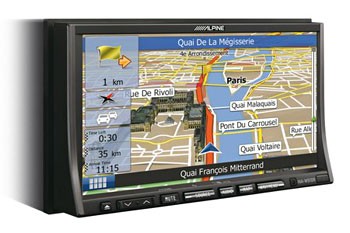
First of all, be sure you got the update file for your Alpine INA-W910R device, downloaded from SpeedcamUpdates.com.
If still haven't got it, you can get it now filling the form you see on this page.
- Extract files from the SpeedcamUpdates zip package. If the file you have downloaded is not a ZIP file means the file is already decompressed, and you can continue with the next step of this installation instructions.
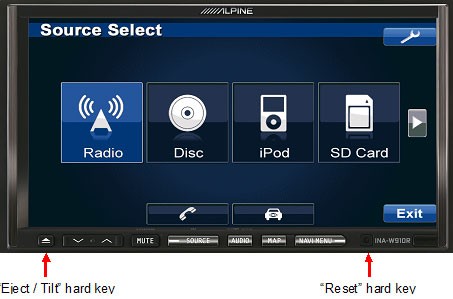
- Power the unit on and insert the SD card into INA-W910R. The SD card slot is accessible by pressing the "Eject/Tilt” hard key. The "Eject/Tilt” hard key is located as indicated below. Then press the “Open” soft key.
- Reset INA-W910R to initialize the update. The “Reset” hard key is located as indicated below. Use a pencil to press the “Reset” hard key.
- The Update is finished once the popup message “Navigation Update Successful” is displayed. Press the “OK” soft key.
- The update process might take a few minutes. Please wait until you see the confirmation screen.
Remember you can customize freely your download. Get access to the customer control panel and using the customization tool in order to get a customized speedcam database according to your needs. You will need this tool if your device doesn't accept the size of the new update. You can add and remove countries speedcam data to your current setup.
Alpine INA-W910R Speed Camera Update Information
The Alpine INA-W910R features comprehensive map coverage, ensuring you have access to detailed navigation data for your journeys. Regular map database updates are essential for maintaining accurate routing and points of interest. To keep your navigation system current, check for updates periodically through the official Alpine website or authorized dealers. Updated maps can enhance your driving experience by providing the latest road information, including new routes, changes in traffic patterns, and updated points of interest. Staying current with map updates is crucial for effective navigation and avoiding potential detours.
To install or update maps on the Alpine INA-W910R, you can utilize either a USB drive or an SD card. Begin by downloading the latest map updates from the Alpine website onto your computer. If using a USB drive, ensure it is formatted correctly and transfer the update files. For SD card users, insert the card into your computer and copy the update files directly. Once the files are ready, insert the USB drive or SD card into the INA-W910R unit. Follow the on-screen prompts to complete the installation process, ensuring that your navigation system is equipped with the latest maps.
The Alpine INA-W910R provides precise route guidance, helping you navigate to your destination efficiently. The system offers turn-by-turn directions, ensuring you stay on track throughout your journey. Additionally, the INA-W910R is equipped with a speed camera alert feature, which notifies you of nearby speed cameras, enhancing your awareness and promoting safe driving. To utilize this feature effectively, ensure that your map database is updated regularly, as this will provide the most accurate locations of speed cameras and other relevant navigation data.
Looking for additional GPS update information and compatible navigation systems?
GPS Update & Installation Guide